Unlocking Whimsy: A Practical Guide to Using Fanciful Feathers and Fronds Clip Art
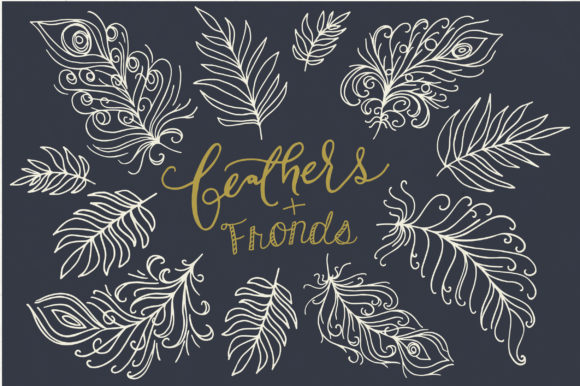
There is a distinct charm in hand-drawn elements that digital perfection often lacks. When you incorporate the Fanciful Feathers and Fronds Clip Art collection into your workflow, you are tapping into a specific aesthetic defined by whimsy, magic, and organic movement. This sweet bundle was drawn by hand, offering a texture and soul that generic stock vectors frequently miss. Whether you are a small business owner crafting a new brand identity, a blogger designing invitations, or a professional marketer looking to soften a corporate presentation, these assets provide that "extra something" essential for memorable design. However, possessing high-quality assets is only half the battle; knowing how to deploy them effectively without falling into common technical or creative traps is what separates amateur results from professional polish.
Understanding the Versatility of Hand-Drawn Assets
The primary appeal of this collection lies in its dual nature. It offers sixty unique PNG designs, each available in both black and white versions and two sizes (small and large). Furthermore, the inclusion of fully editable vector files means you are not locked into a static image. Many creators overlook the strategic value of having both raster (PNG) and vector (AI, EPS) formats in one package. The PNGs are excellent for quick drag-and-drop applications in word processors or basic web builders, while the vectors offer infinite scalability for large-format printing or complex logo manipulation. Ignoring the vector component limits your long-term usability, especially if your brand grows and requires signage or merchandise where pixelation would be disastrous.
Common Pitfalls in Selection and Application
Even with premium resources like Fanciful Feathers and Fronds, users often make avoidable errors that diminish the final output. One frequent mistake is neglecting the context of the design. Because these elements are whimsical and magical, there is a temptation to overuse them. Placing too many fronds and feathers on a single invitation or logo can create visual noise, confusing the viewer rather than delighting them. The best approach is restraint; treat these elements as accents that frame your core message, not as the message itself.
Another significant oversight involves color management. The bundle comes in black and white, which is intentional to give you maximum flexibility. A common error occurs when users attempt to recolor the black-and-white PNGs using basic tools that do not preserve transparency or edge quality, resulting in jagged, pixelated halos around the delicate lines. To avoid this, utilize the provided Photoshop brush set (.ABR) for texturing or, better yet, import the AI or EPS vector files into Illustrator. This allows you to change the stroke color instantly while maintaining crisp, smooth edges regardless of how much you resize the element.
Misunderstanding File Formats and Compatibility
Confusion regarding file types often leads to frustration during the editing process. You might receive the package and immediately try to open the .AI files in a program that does not support them, leading to error messages or flattened images. Before diving in, verify your software capabilities. The bundle includes two AI CS1 files and two EPS files. While EPS is widely compatible with most graphics programs, the AI files require Adobe Illustrator. If you do not have Illustrator, rely on the EPS files for vector editing or the high-resolution PNGs for composition.
Additionally, many users skip the included PDF font guide. The four ready-made logo templates are designed with specific typography in mind to complement the hand-drawn style. Substituting these fonts with default system fonts like Arial or Times New Roman can clash with the whimsical nature of the feathers, making the final logo look disjointed. Always download the recommended fonts listed in the guide to ensure the typography harmonizes with the illustrative elements.
Maximizing Efficiency with Ready-Made Templates
Time is a critical resource for entrepreneurs and freelancers. This collection offers four ready-made logo templates specifically designed to provide an instant solution. A mistake many make is treating these templates as final products without customization. While they are excellent starting points, using them exactly as-is means your brand may look identical to another user who purchased the same bundle. To maintain uniqueness, use the templates as a structural foundation. Swap out the feather arrangements, adjust the curvature of the fronds using the layered vector files, or integrate your specific color palette. The files are organized and labeled for ease of use, so take advantage of the layer structure to deconstruct and rebuild the logo to suit your specific niche.
For those working in Photoshop, the included brush stamp set is a powerful but often underutilized tool. Instead of just placing static PNGs, use the brushes to paint textures directly onto your backgrounds or masks. This creates a more integrated, organic feel where the feathers appear to be part of the scene rather than stickers pasted on top. Remember to follow the included PDF brush installation instructions carefully; improper installation can lead to missing presets or low-resolution stamps.
Checklist Before You Begin Your Project
To ensure you get the most out of the Fanciful Feathers and Fronds Clip Art set, run through this quick verification list before finalizing your designs:
- Verify Resolution: Ensure you are using the "large" PNG version for any print materials to avoid blurriness.
- Check Layers: Open the vector files first to confirm all elements are on separate, labeled layers for easy editing.
- Install Fonts: Download and install the suggested fonts from the guide before opening the logo templates.
- Test Recoloring: Perform a test recolor on a vector file to ensure your software handles the stroke changes correctly.
- Review Licensing: Confirm the usage rights align with your project, whether it is for personal stationery or commercial client work.
By approaching this bundle with a clear understanding of its components and avoiding these common technical missteps, you transform a simple clip art pack into a versatile design engine. The combination of hand-drawn charm and technical flexibility makes it a valuable asset for anyone looking to inject a touch of magic into their visual communication. Whether you are building a brand from scratch or adding a decorative flourish to a wedding invitation, the key lies in thoughtful application and respecting the capabilities of the file formats provided.