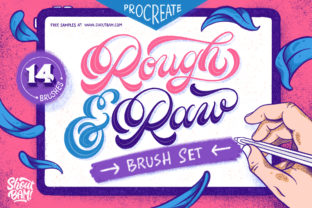
Rough Raw Procreate Brush Set: Add Handmade Texture
Digital art often faces a common critique: it can look too clean, too perfect, and occasionally a bit sterile. While precision is a superpower of tablets and styluses, many artists miss the organic unpredictability of traditional media. This is where the Rough Raw Procreate Brush Set changes the game. It is a curated collection designed specifically to bridge the gap between digital convenience and the tactile feel of real-world materials. If you have ever wanted your iPad illustrations to carry the grit of charcoal or the uneven charm of a worn-out paintbrush, this toolset provides exactly that unique handmade touch.
The core appeal of this set lies in its origin. Unlike many digital brushes that rely on mathematical algorithms to create texture, these were generated from real-life textures. This means every stroke you make carries the authentic imperfections of physical matter. Whether you are a professional illustrator looking to diversify your portfolio, a hobbyist wanting to make your journal entries pop, or a small business owner creating social media graphics, adding a rough edge to your artwork can make it feel more human and approachable.
Why Choose a Textured Digital Workflow?
In a world saturated with polished vector graphics and smooth gradients, standing out requires a distinct visual voice. The Rough Raw Procreate Brush Set helps you achieve this by introducing controlled chaos into your workflow. The "roughness" isn't a bug; it's a feature. It allows for lettering pieces that look hand-painted rather than typed, and illustrations that feel sketched rather than rendered.
This set is particularly valuable for creators who struggle with the "blank canvas" intimidation factor. When your tools mimic familiar physical mediums, the barrier to entry lowers. You aren't just moving pixels; you are simulating the experience of pressing charcoal onto paper. This psychological shift can boost creativity and help beginners feel more confident in their strokes. For entrepreneurs and marketers, this aesthetic translates to branding that feels artisanal and trustworthy, appealing to audiences who value authenticity over corporate slickness.
What Is Inside the Box?
The set includes a total of 14 specialized brushes, evenly split between 7 line brushes and 7 texture brushes. This balance ensures you have everything needed to both outline your ideas and fill them with rich, organic detail. Here is a closer look at some of the standout tools included in the package:
- Charcoal: Designed specifically for sketching, this brush imitates real compressed charcoal. It delivers a nice, unrefined texture that is perfect for initial concept art or shading that needs depth without looking digital.
- Noisy Pencil: Created from a cluster of tiny dots, this tool is ideal for gritty line work. It adds a subtle grain to your outlines, making technical drawings feel more like field notes.
- Monoline Stamp: A favorite for lettering artists, this brush maintains a consistent width while applying a great halftone texture. It is excellent for headlines and logos that need to be legible yet stylish.
- Frizzy Brush: This tool imitates a real wasted brush with splayed bristles. It was created specially for calligraphy pieces where you want that dry, scratchy finish at the end of a stroke.
- Ripple-izer: Are you a fan of retro design? This line brush provides a distressed result, helping you achieve a nice mid-century modern feeling instantly.
- Savage: As the name suggests, this brush encourages you to go nuts. It is unpredictable and super fun, perfect for abstract backgrounds or expressive splashes of color.
- Inliner: A calligraphy brush with a deliberate rough edge, ideal for adding character to script fonts and decorative borders.
Practical Applications for Creators
The versatility of the Rough Raw Procreate Brush Set means it fits into various workflows, from casual doodling to commercial projects. For educators and bloggers, these brushes can transform standard diagrams into engaging, hand-drawn visuals that hold student attention better than sterile clipart. Imagine explaining a complex concept with a sketch that looks like it was drawn on a napkin; it feels personal and accessible.
For freelance designers and agency owners, this set is a time-saver. Instead of spending hours scanning real paper textures and overlaying them in post-production, you can apply the texture directly as you draw. The Ripple-izer and Savage brushes are particularly useful for creating vintage-style posters, concert flyers, or packaging designs that require a retro aesthetic. The built-in distress means less editing time and faster turnaround for clients.
Hobbyists and journalers will find the Charcoal and Noisy Pencil indispensable for digital bullet journals. These tools allow for the creation of mood boards and trackers that retain the cozy, analog feel of a physical notebook, even when viewed on a screen. The ability to switch between a clean monoline for structure and a frizzy brush for emphasis adds a dynamic layer to personal planning.
Getting Started: Compatibility and Setup
To get the best usage out of this collection, you will need an iPad with Procreate installed and an Apple Pencil. While other styluses may work, the pressure sensitivity and tilt recognition of the Apple Pencil are essential for unlocking the full potential of these textured brushes. The variation in line weight and texture density often relies on how hard you press or how you angle your device.
Installation is straightforward. The download comes with an easy-to-follow installation guide that walks you through importing the brush set into Procreate. Once imported, the brushes appear in their own folder, keeping your library organized. It is recommended to spend a few minutes testing each brush on a blank canvas to understand how they react to different speeds and pressures. For instance, dragging the Savage brush quickly creates a different effect than dabbing it slowly.
Things to Consider Before You Start
While the Rough Raw Procreate Brush Set offers immense creative freedom, there are a few practical considerations to keep in mind. First, because these brushes simulate complex textures, they can be slightly heavier on your device's processor compared to basic round brushes. If you are working on a very large canvas with hundreds of layers, you might notice a slight lag, so it is wise to manage your layer count effectively.
Secondly, the "rough" nature of these tools means they are not intended for ultra-precise technical drafting. If your goal is to create crisp architectural blueprints or pixel-perfect UI icons, you might prefer standard geometric brushes. However, for anything involving illustration, typography, or conceptual art, the lack of perfection is precisely what adds value.
Finally, remember that the best results come from experimentation. Do not be afraid to adjust the size, opacity, or flow settings within Procreate to customize how these brushes behave. The Inliner might work beautifully at 50% opacity for a subtle background pattern, while the Monoline Stamp could shine at 100% for bold headers. The Rough Raw Procreate Brush Set is not just a tool; it is a starting point for developing a signature style that feels uniquely yours.