Mastering Digital Lettering: A Complete Guide to the Nine6brush V2 Collection for Procreate
In the rapidly evolving world of digital art, the tools an artist chooses can make the difference between a good piece and a masterpiece. For those specializing in typography, calligraphy, and hand-lettering, the brush engine is the heart of the creative process. Enter Nine6brush V2, a specialized, unique brush set designed exclusively for Procreate. This collection has quickly become a staple for lettering artists, calligraphers, and type designers who seek to expand their typographic vocabulary with professional-grade textures and styles.
Whether you are a beginner picking up an iPad for the first time or an experienced designer looking to refresh your workflow, understanding how a comprehensive tool like Nine6brush V2 fits into modern creativity is essential. This guide explores the significance of this tool, breaks down its features, and explains how it empowers users to write like a pro.
What is Nine6brush V2?
At its core, Nine6brush V2 is not just a single brush; it is a complete ecosystem of digital painting tools tailored specifically for the Procreate application on iPad. While many brush sets offer generic strokes, this collection was engineered with a specific purpose: to replicate the tactile sensation of traditional media while leveraging the power of digital flexibility.
The "V2" designation indicates an evolved version, refined based on user feedback and artistic trends. It addresses a common pain point in digital lettering: the lack of texture variation when working on different background colors. Many standard brushes look flat on dark backgrounds or lose their grit on bright ones. Nine6brush V2 solves this by offering different texture sensations that remain vibrant and authentic regardless of whether you are designing a neon sign on a black canvas or a wedding invitation on white paper.
The Significance of Specialized Typography Tools
Typography is more than just arranging letters; it is about conveying emotion and tone through shape and texture. In modern business and education, custom lettering is used everywhere from branding logos to educational infographics. Using a generic brush often results in work that looks "digital" and sterile.
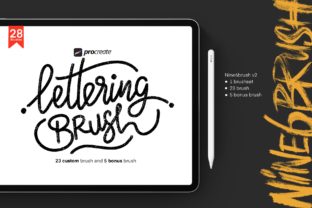
Nine6brush V2 bridges this gap. By providing 28 unique brushes, it allows artists to mimic real-world materials like rough grunge, flowing ribbons, and glowing neon lights. This variety ensures that every project has a distinct personality, helping creators stand out in a saturated market.
Inside the Collection: A Breakdown of the 28 Brushes
The true value of Nine6brush V2 lies in its comprehensive nature. The download package is meticulously organized to cover a wide spectrum of artistic needs. Here is what is included in the file download:
- Main Set: 23 custom brushes designed for core lettering tasks.
- Bonus Pack: 5 additional custom brushes for experimental effects.
- Total Count: 28 unique brushes ready for immediate use.
This extensive library covers a diverse range of styles, ensuring that you never feel limited by your toolkit. Let's explore some of the key categories included in the set:
- Script Brushes: Perfect for fluid, connected handwriting that mimics fountain pens and dip nibs. These are ideal for elegant invitations and signature logos.
- Paint Brushes: Designed to replicate the weight and flow of acrylics or oils, adding body and depth to bold headlines.
- Grunge and Rough Texture: These brushes introduce imperfection and character, essential for vintage posters, street art styles, and distressed branding.
- Neon Light: A modern favorite for social media graphics and night-time aesthetics, allowing users to create glowing effects effortlessly.
- Ribbon Styles: Specialized strokes that help create dimensional, weaving letterforms without complex layer masking.
Why Texture Matters in Digital Design
A common misunderstanding among beginners is that digital art should look clean and vector-like. However, the most engaging digital illustrations often incorporate texture to create a human connection. Nine6brush V2 excels here by embedding complex texture data into the brush stroke itself.
When you use these brushes, the software automatically applies subtle variations in opacity and grain. This means that even a single straight line will have the organic feel of being drawn on textured paper. This feature is particularly significant when working on dark backgrounds. Standard brushes often appear too solid or "plastic" against black or deep blue canvases. The unique texture engine in Nine6brush V2 ensures that the grain shows through, creating a realistic interaction between the "ink" and the "paper," even in low-light color schemes.
Practical Applications for Professionals and Hobbyists
How does this tool fit into daily life and work? The applications are vast:
- Branding and Business: Small business owners can create unique logos without hiring an expensive agency. The grunge and paint brushes allow for rugged, memorable brand identities.
- Social Media Content: Influencers and content creators can use the neon and script brushes to design eye-catching stories and posts that stop the scroll.
- Education: Teachers creating digital worksheets can use the clear script brushes to mimic handwriting, making learning materials feel more personal and approachable for students.
- Type Design: Aspiring type designers can use the varied strokes to sketch out new font concepts, experimenting with weight and contrast instantly.
Getting Started: Tips for Maximizing Nine6brush V2
To truly "write like a pro" with this set, it is important to understand how to leverage its features effectively. Here are a few strategies to build a broader understanding of using these tools:
1. Experiment with Opacity and Flow
While the brushes come pre-configured for optimal performance, adjusting the opacity slider in Procreate can yield different results. Lowering the opacity on the Rough Texture brushes can create a weathered, faded look perfect for retro designs.
2. Layering Techniques
Don't be afraid to layer different brushes from the set. Try writing a base layer with a Paint brush and then overlaying a Grunge brush on top to add distress marks. This technique adds depth that a single brush stroke cannot achieve.
3. Background Testing
Take advantage of the brush set's versatility by testing your lettering on both light and dark backgrounds immediately. You will notice how the texture adapts, giving you confidence that your design will work across various mediums, from print to screen.
Conclusion: Elevating Your Creative Workflow
The Nine6brush V2 collection represents a significant step forward for digital lettering enthusiasts. By combining a massive variety of 28 brushes with advanced texture capabilities, it removes the technical barriers that often hinder creativity. Whether you are crafting a delicate script for a wedding invite or a bold, neon-lit headline for a concert poster, this toolset provides the necessary foundation.
In an era where digital content is king, having a unique voice is crucial. Nine6brush V2 empowers artists to find that voice by offering the flexibility to switch styles instantly and the fidelity to make digital strokes feel wonderfully human. For anyone looking to master typography in Procreate, this collection is not just an accessory; it is an essential partner in the creative journey.