Integrating Scrambled Letters Photo Overlays into Professional Visual Workflows
In the current digital landscape, visual communication often requires more than just a clean, high-resolution photograph. Whether you are a marketer designing a social media campaign, an educator creating engaging course materials, or a small business owner building a brand identity, the ability to layer texture and meaning onto an image is crucial. This is where Scrambled Letters Photo Overlays become an essential asset in your creative toolkit. These resources are not merely decorative; they are functional components that, when integrated correctly, can elevate the narrative depth of your visual projects while maintaining a professional standard of quality.
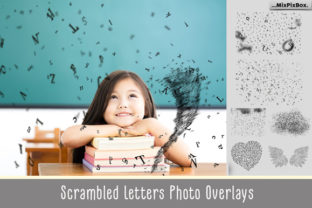
The core value of this specific asset pack lies in its technical specifications and versatility. Comprising 26 individual PNG files with transparent backgrounds, these overlays are rendered at a high resolution of 5100x3450 pixels at 300 DPI. For professionals, these numbers translate directly to workflow flexibility. A 300 DPI resolution ensures that the assets are print-ready, meaning you can use them for physical merchandise, brochures, or large-format posters without worrying about pixelation or loss of detail. Simultaneously, the high pixel dimensions allow for significant cropping and resizing within digital environments, ensuring that the scrambled text remains crisp on high-density retina displays and mobile screens alike.
Strategic Placement in the Creative Process
Understanding where Scrambled Letters Photo Overlays fit into a broader project lifecycle is key to maximizing their utility. They are rarely the starting point of a project but serve as a powerful refinement tool during the execution and finalization phases. In a typical design workflow, you begin with base photography or illustration. Once the composition is established, these overlays act as a bridging element between the raw image and the final branded output.
For entrepreneurs and content creators, the decision to use scrambled text often comes during the "polish" stage. You might have a portrait that feels too sterile or a product shot that lacks context. Applying a letter overlay introduces an element of chaos or complexity that can make the image feel more organic and less like a stock photo. This is particularly effective in industries like fashion, tech, and modern education, where a slightly deconstructed aesthetic signals innovation and creativity. By introducing these elements before the final export, you ensure that the textural integration feels native to the image rather than an afterthought.
Technical Implementation and Layer Management
The practical application of these assets relies heavily on software that supports layer-based editing. The package includes 24 scrambled letters Photoshop brushes alongside the PNG files, offering two distinct methods of implementation depending on your preferred workflow. For users operating within Adobe Photoshop or Photoshop Elements, the process is streamlined. You place the overlay layer directly above your background image. At this stage, the scrambled letters will likely cover critical details, such as a subject's face or key product features.
This is where the instruction to "erase with a soft brush" becomes a vital technique. Using a soft-edged eraser or a layer mask allows you to selectively reveal parts of the underlying image. This technique creates a sense of depth, making it appear as though the text is weaving in and out of the subject matter. It prevents the overlay from looking like a flat sticker pasted on top. For instance, if you are creating a promotional graphic for a workshop, you might let the scrambled letters obscure the background scenery but carefully erase the areas covering the speaker's eyes to maintain a human connection with the viewer. This balance between obstruction and revelation is what separates amateur edits from professional designs.
Compatibility is a major factor in planning your workflow. While the primary design is for Photoshop, the PNG format ensures broad interoperability. Users of Paint Shop Pro, GIMP, Affinity Photo, and other layer-capable software can import these files without conversion issues. However, a specific note applies to Adobe Lightroom users. Since Lightroom is primarily a non-destructive raw processor and does not natively support layers in the same way Photoshop does, integrating these overlays requires a plugin that enables layer functionality. Without such a plugin, attempting to use these transparent PNGs in Lightroom will result in a solid white or black box rather than a transparent overlay. Planning for this software limitation ahead of time prevents bottlenecks in your production schedule.
Enhancing Brand Consistency and Visual Identity
For publishers and bloggers, consistency is the cornerstone of brand recognition. Scrambled Letters Photo Overlays can be standardized across a content calendar to create a signature look. By consistently applying the same style of textural overlay to all blog headers or social media posts, you create a visual rhythm that audiences subconsciously recognize. This does not mean using the exact same letter arrangement every time; rather, it involves adopting a consistent method of blending and masking.
Consider a freelancer managing multiple client accounts. These overlays offer a neutral yet stylish aesthetic that adapts well to various color grading styles. Because the letters are essentially monochromatic (typically black or white depending on the blend mode used), they do not clash with existing brand colors. Instead, they interact with the luminance of the underlying photo. Changing the blend mode to "Multiply" darkens the underlying pixels, while "Screen" lightens them. This interaction allows the overlay to adapt to both light and dark photography, providing a unified feel across a diverse portfolio of images.
Efficiency in High-Volume Production
Time management is a critical resource for marketers and small business owners. The inclusion of Photoshop brushes alongside the PNG files addresses the need for speed. When working on a batch of images, dragging and dropping 26 individual files can become tedious. The brushes allow for rapid application, letting you paint the scrambled texture directly onto specific areas of the canvas. This is particularly useful when you need the effect to follow a specific contour or when you want to vary the opacity dynamically across a single image.
Furthermore, the high resolution of 5100x3450px means you do not need to search for different assets for different formats. The same file can be scaled down for an Instagram story, cropped for a LinkedIn banner, or used at full size for a printed flyer. This reduces the time spent organizing digital assets and searching for the right resolution, allowing you to focus on the creative decisions that drive engagement.
Quality Control and Long-Term Usability
When integrating new tools into a professional routine, longevity is a key consideration. Digital trends shift rapidly, but the concept of typographic texture has remained a staple in graphic design for decades. Unlike specific filters or trendy color presets that may look dated in a year, scrambled letter overlays provide a structural element that remains relevant. The abstract nature of the scrambled text means it does not convey a specific message that could become obsolete; instead, it conveys a mood or a style.
To ensure long-term usability, proper organization of these files is recommended. Store the PNGs and brushes in a dedicated folder within your asset library, tagged with keywords like "texture," "typography," and "overlay." This ensures that when you are six months into a project and need to refresh an old graphic, you can quickly locate and re-apply the effect. Additionally, because the files are high resolution, they future-proof your work. As display technologies improve and print standards demand higher fidelity, these 300 DPI assets will continue to meet industry requirements without needing replacement.
In conclusion, Scrambled Letters Photo Overlays represent a intersection of artistic flair and technical utility. They are designed for the practitioner who understands that great design often happens in the details—the subtle interplay of layers, the careful masking of faces, and the strategic use of texture to guide the viewer's eye. By incorporating these 26 transparent PNGs and accompanying brushes into your workflow, you gain a reliable method for adding depth and interest to your visual communications. Whether you are editing a single hero image for a website or producing a hundred graphics for a marketing campaign, these tools provide the resolution, compatibility, and flexibility needed to execute your vision with precision and efficiency.