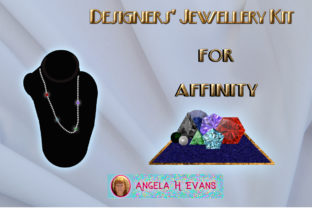
Design Stunning Jewellery with Affinity's Kit
Ever wanted to make your own jewellery but could not afford all those diamonds and other gems? For many creative minds, the barrier to entry in jewellery design has always been the cost of materials. Beads and other gems can quickly drain a budget before a single piece is finished. Look no further than this amazing kit to bridge the gap between imagination and digital reality. The Designer's Jewellery Kit for Affinity offers a practical, affordable solution for artists who want to visualize luxury without the luxury price tag. It allows you to craft intricate designs entirely within your software, giving you the freedom to experiment with high-end materials virtually before committing to physical production.
This collection is specifically tailored for users of Affinity Designer and Affinity Photo, providing a suite of tools that mimic the look and feel of real precious stones and metals. Whether you are a hobbyist looking to create custom gifts or a professional entrepreneur designing a catalog for a small business, this kit provides the essential building blocks. It includes two primary asset types designed to help you display your shiny new rings, necklaces, and bracelets with professional polish. By leveraging these digital assets, you can produce marketing materials, social media content, or concept art that looks incredibly realistic.
Bringing Beads and Gems to Life Digitally
One of the most immediate challenges in digital jewellery design is creating repetitive elements like strings of beads without spending hours drawing each circle individually. Need a string of beads? Look no further than the Beads Brush set included in this package. These brushes are engineered to streamline your workflow, allowing you to paint perfect strands of pearls, crystals, or metallic beads with a single stroke. This feature is particularly valuable for beginners who may struggle with vector alignment or raster consistency.
Gems? Yes, there is a brush set for those too. The kit recognizes that variety is the spice of design, which is why it includes tools specifically for gemstone creation. With 7 different gem face cuts, you are not limited to a single generic shape. You can switch between emerald cuts, round brilliants, and marquise shapes instantly. Furthermore, the integration with the software's Swatch panel means you can change the colour of your gems on the fly. Want a sapphire necklace today and a ruby ring tomorrow? Simply select a new swatch, and the brush updates automatically. This flexibility encourages experimentation and helps you find the perfect colour combinations for your brand or project.
Enhancing Realism with PNG Sets and Styles
While brushes are excellent for speed and layout, sometimes you need more realistic gems to serve as the focal point of a design. For these moments, the kit provides high-quality PNG Gem sets. These pre-rendered images offer complex light refraction and shading that can be difficult to replicate manually. They are ideal for creating hero images for websites or detailed close-ups for print advertisements. Because they are PNG files, they come with transparent backgrounds, making it effortless to drop them into any composition without tedious editing.
The value of this kit extends beyond just brushes and images; it also includes a robust collection of Styles. The styles set includes gold and silver edged styles specifically designed for brooches and various gem shapes. Applying these styles adds an instant layer of sophistication to flat shapes, turning a simple vector circle into a gleaming gold pendant or a silver-set diamond. This is a game-changer for entrepreneurs who need to produce large volumes of product mockups quickly. Instead of manually adding gradients and strokes to every item, you can apply a preset style and achieve a consistent, high-end look across your entire portfolio.
Versatility for Web and Print Projects
A common concern for creators is whether digital assets will hold up across different mediums. Will they look pixelated on a billboard or blurry on a smartphone screen? The Designer's Jewellery Kit for Affinity addresses this by ensuring high fidelity across the board. The textures and styles included are created at 300 DPI, making them perfectly suitable for both web and print applications. This means you can design a business card, a magazine ad, or a large format poster with the confidence that your digital jewels will retain their crispness and detail.
Regarding the brushes, they are set at 64 pixels but can be reduced in size if needed. While this might seem specific, it offers a great balance between detail and performance. For most digital illustrations and web graphics, this resolution is more than sufficient. If you are working on a massive print project, the accompanying PNG sets and vector-based styles ensure you never run out of quality options. This dual-approach makes the kit adaptable for freelancers working with diverse client needs, from Instagram influencers needing quick stories to established brands requiring print-ready catalogs.
Practical Uses for Creators and Businesses
So, where exactly can you use these tools? The applications are vast. For educators teaching graphic design, this kit serves as an excellent resource for lessons on texture, lighting, and pattern creation. Students can learn how to construct complex jewellery pieces without needing access to a physical studio. For bloggers and marketers, the ability to generate unique jewellery imagery means you can create eye-catching headers and product features without licensing expensive stock photography or organizing a photoshoot.
Small business owners and entrepreneurs in the fashion industry will find immense value here. You can prototype new designs digitally to test market reaction before investing in manufacturing. If you run an online store selling handmade goods, you can use the kit to create lifestyle mockups showing how your clasps or chains look when paired with different gems. Even hobbyists can enjoy the process of designing their dream engagement ring or a custom necklace for a friend, purely for the joy of creation.
Important Considerations Before Starting
Before diving in, it is helpful to understand a few practical aspects of using the Designer's Jewellery Kit for Affinity. First, while the tools are beginner-friendly, having a basic understanding of your Affinity software will enhance your experience. Knowing how to navigate the Swatch panel or adjust brush dynamics will allow you to get the most out of the 7 different gem face cuts and colour options.
Additionally, consider your end goal. If you are aiming for hyper-realism for a high-fashion campaign, combining the PNG sets with the vector styles will yield the best results. For quicker, stylized illustrations, the brushes alone may suffice. Remember that while the brushes are 64 pixels, scaling them up significantly beyond their intended size might affect sharpness, so relying on the 300 DPI textures for large-scale print work is advisable.
Ultimately, this kit removes the financial and logistical hurdles of traditional jewellery making. It empowers you to focus on design, colour theory, and composition. Whether you are looking to launch a new brand, enhance your digital portfolio, or simply explore a new creative outlet, these assets provide a solid foundation. By offering a blend of efficiency and aesthetic quality, the kit ensures that your digital jewellery looks as precious as the real thing, all while keeping your budget intact.