Evaluating the 13 Seamless Rope Brush Set for Adobe Illustrator
For graphic designers working within the Adobe ecosystem, finding assets that balance aesthetic quality with technical efficiency is a constant pursuit. The 13 Seamless Rope Brush Set for AI represents a specialized collection of vector tools designed to streamline the creation of nautical and vintage-themed artwork. This set is specifically engineered for Adobe Illustrator, requiring a minimum version of CS4 to function correctly. By understanding the capabilities, limitations, and ideal use cases of this brush set, designers can make an informed decision about whether it aligns with their current project requirements and workflow preferences.
Understanding the Asset Collection
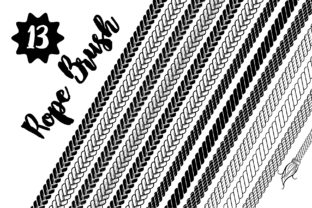
At its core, this product is a library of pattern brushes that simulate the texture and form of twisted rope. Unlike standard stroke lines, which appear flat and uniform, these brushes apply a complex vector pattern along a path, creating the illusion of three-dimensional cordage. The term "seamless" indicates that the pattern repeats without visible breaks or jagged edges when applied to curved or straight lines, a critical feature for maintaining professional quality in vector illustrations.
The collection includes thirteen distinct variations, offering a range of thicknesses and twist styles. Beyond the basic line tools, the set provides pre-made objects, frames, borders, and nodes. These additional elements are significant because they reduce the time required to construct complex compositions. Instead of manually drawing every corner joint or end cap, a designer can utilize these pre-configured assets to build cohesive structures quickly. The compatibility with Adobe Illustrator CS4 and later versions ensures that the tool remains accessible to users who may not be on the latest Creative Cloud subscription, broadening its utility across different studio environments.
Primary Applications and Design Themes
The specific nature of rope textures makes this brush set highly relevant for certain design niches. Its primary strength lies in Marine Theme designs. Projects involving sailing clubs, yacht branding, seafood restaurants, or coastal tourism materials often require authentic nautical elements. In these contexts, the ability to rapidly generate rigging, nets, or decorative borders adds immediate thematic clarity to the visual identity.
Furthermore, the aesthetic of twisted rope aligns well with Vintage and Retro design themes. Before the digital age, rope was a common motif in labeling, packaging, and signage for goods ranging from coffee to hardware. Designers aiming to evoke a sense of tradition, craftsmanship, or old-world charm can leverage these brushes to create authentic-looking frames and dividers. The texture provided by the vector ropes offers a tactile quality that flat colors often lack, helping to ground a design in a specific historical or stylistic context.
Workflow Efficiency and Usability
One of the most compelling arguments for adopting the 13 Seamless Rope Brush Set for AI is the potential improvement in workflow efficiency. The operational logic is straightforward: a user draws a standard line using the Pen Tool or Pencil Tool, selects a specific brush from the panel, and the stroke instantly transforms into a rope shape. This "draw and apply" methodology eliminates the need for manual vector tracing or complex blending modes to achieve a similar effect.
The inclusion of pre-made objects further accelerates the design process. Creating a custom frame with mitered rope corners can be technically challenging in vector software, often requiring precise manipulation of anchor points to ensure the twist of the rope flows logically around bends. By providing ready-to-use frames and nodes, the set removes this technical barrier. This allows designers to focus more on composition and layout rather than getting bogged down in the mechanics of constructing the asset itself. For professionals working under tight deadlines, this time savings can be a decisive factor.
Considerations and Technical Tradeoffs
While the benefits are clear, there are tradeoffs and considerations that potential users should evaluate. First, the reliance on pattern brushes means that editing the underlying shape of the rope requires an understanding of how Illustrator handles brush scaling. If a path is scaled non-uniformly, the rope texture may distort, appearing stretched or compressed. Users must be disciplined in using the Stroke panel to adjust weight rather than the Selection Tool to resize, ensuring the texture remains consistent.
Additionally, while the set covers a variety of rope styles, it is inherently limited to the thirteen included variations. A project requiring a specific type of knot, a synthetic nylon look, or a heavily weathered, frayed appearance might find the existing options insufficient. In such cases, the designer would need to modify the base brushes or supplement them with other assets. The "vintage" style is also subjective; if a project demands a hyper-realistic photographic look rather than a stylized vector illustration, these brushes may appear too graphic or clean.
Compatibility is another factor. Although the requirement is only CS4, users working in very old legacy systems must ensure their operating system supports that version of Illustrator. Conversely, users on the newest CC versions will find full support, but they should verify that the brush definitions do not trigger any deprecated feature warnings, although this is rare for standard pattern brushes.
When to Choose This Set vs. Alternatives
Deciding whether to integrate this set into your library depends on the frequency and nature of your work. This tool is a strong fit for designers who regularly produce branding materials for maritime industries, event invitations with nautical motifs, or retro-style packaging. If your portfolio frequently features organic textures and hand-drawn aesthetics, having a dedicated rope toolset prevents the need to recreate these elements from scratch for every new client.
However, alternatives may be worth considering if your work is predominantly corporate, minimalist, or focused on modern tech interfaces where rope textures are irrelevant. Similarly, if you require absolute control over every strand of the rope for high-fidelity illustration, building custom brushes from scratch or using 3D modeling software might yield better results, albeit with a higher time investment. For one-off projects where a single rope element is needed, free online vectors or drawing a simple stroke with a textured effect might suffice without the need for a dedicated purchase.
Final Decision-Making Insights
In evaluating the 13 Seamless Rope Brush Set for AI, the value proposition centers on the balance between specialization and convenience. It is not a general-purpose tool for all illustrators, but for those whose work touches on marine, sailing, or vintage themes, it offers a robust solution. The seamless nature of the patterns ensures professional output, while the inclusion of frames and nodes addresses common pain points in vector construction.
Prospective users should assess their current project pipeline. If there is an upcoming need for nautical or retro assets, this set provides a reliable foundation that adheres to industry-standard software requirements. By automating the texturing process, it allows creatives to maintain momentum and focus on the broader narrative of their design. Ultimately, the decision rests on whether the specific aesthetic of these thirteen brushes matches the visual language required for your next campaign or client deliverable.