Unlocking Creative Flow: A Deep Dive into the 15 Tangle Pattern Brush Set for Adobe Illustrator
In the rapidly evolving landscape of digital design, efficiency and aesthetic uniqueness are often at odds. Designers frequently find themselves spending hours crafting intricate details by hand, only to realize that scaling those designs or adapting them to different shapes is a tedious process. This is where the concept of pattern brushes becomes not just a tool, but a transformative element in a creative workflow. Specifically, the 15 Tangle Pattern Brush Set represents a significant leap forward for users of Adobe Illustrator CC, bridging the gap between organic, hand-drawn charm and the precision of vector technology.
For those new to the world of vector graphics, understanding the power of these brushes requires looking beyond simple lines. This article explores the purpose, significance, and practical application of this specific brush collection, helping both beginners and seasoned professionals understand how it fits into modern creative work.
What Are Tangle Pattern Brushes?
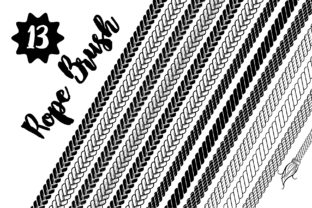
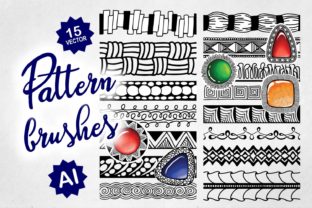
At their core, tangle pattern brushes are specialized digital tools designed to repeat a specific artistic motif along a path. Unlike a standard calligraphy brush that simply changes thickness based on pressure, a pattern brush tiles a complex design seamlessly as you draw. The 15 Tangle Pattern Brush Set offers a curated library of fifteen distinct textures and patterns, each meticulously drawn on a graphic tablet to ensure an organic, human feel.
These are not generic, computer-generated repeats. Because they were created by an artist using a graphic tablet and finalized in Adobe Illustrator CC, they retain the subtle imperfections and fluidity of hand-sketching. This "human touch" is crucial in an era where much digital art can feel sterile or overly mechanical. When you apply these brushes, you are essentially dragging a piece of hand-crafted artistry across your canvas, allowing for instant complexity without the manual labor of drawing every single line.
The Versatility of Application
One of the most common misunderstandings about pattern brushes is that they are limited to straight lines. In reality, the true power of this 15 Tangle Pattern Brush Set lies in its adaptability to various geometric forms. Whether you are working on a rigid architectural blueprint or a flowing organic illustration, these brushes conform to your intent.
Consider the following shapes where these brushes excel:
- Squares and Rectangles: Perfect for creating decorative borders, framing elements for logos, or adding texture to UI design cards.
- Circles: Ideal for creating mandalas, seals, badges, or circular dividers in editorial layouts.
- Curved Paths: Essential for lettering, flourishes, and wrapping text in a visually engaging way.
- Straight Lines: Useful for underlining, separating content, or creating rhythmic backgrounds.
The workflow is incredibly intuitive: you simply choose the brush from the panel and draw the shape. The software handles the complex mathematics of stretching, cornering, and repeating the pattern so that it looks natural. This allows the designer to focus on composition and storytelling rather than the minutiae of pixel-perfect alignment.
Why Adobe Illustrator CC is Essential
A critical aspect of utilizing this specific brush pack is understanding the technical requirements. These brushes are engineered exclusively for Adobe Illustrator CC. Users attempting to load them into older versions of the software (such as CS6 or earlier) will find that they do not function correctly, or at all.
This limitation is not arbitrary; it is a result of innovation. The brush pack utilizes new rendering techniques and engine improvements introduced in the CC version of the software. These updates allow for smoother scaling, better corner handling, and more accurate color management within the brush strokes. By leveraging these modern capabilities, the 15 Tangle Pattern Brush Set achieves a level of fidelity and flexibility that was technically impossible in previous iterations of the software.
For businesses and educational institutions, this highlights the importance of keeping creative suites up to date. While upgrading software can seem like an unnecessary expense, access to tools that utilize the latest engine features can drastically reduce production time. In a professional setting, saving thirty minutes on a single illustration by using a smart brush instead of drawing manually translates to significant cost savings and higher throughput over the course of a year.
Practical Relevance in Modern Workflows
How does this fit into the daily life of a creator? The applications are vast and span multiple industries:
- Branding and Logo Design: A unique border or frame can set a brand apart. Using a tangle pattern adds a bespoke, artisanal quality to a logo that stock vectors often lack.
- Packaging Design: Product packaging often requires intricate patterns that wrap around boxes or bottles. These brushes allow designers to visualize and execute these wraps quickly on curved paths.
- Educational Materials: Teachers and content creators can use these brushes to make worksheets, certificates, and presentations more engaging and visually stimulating for students.
- Fashion and Textile Sketching: Before a pattern goes to print, designers can use these brushes to simulate stitching, lace, or fabric textures on their digital flats.
The ability to switch between these fifteen variations instantly encourages experimentation. A designer might start with a geometric square pattern, realize it feels too rigid, and immediately switch to a curved, organic tangle to soften the look. This iterative process is vital for creativity, allowing ideas to flow without technical friction.
Building a Broader Understanding of Digital Assets
It is important to clarify that purchasing or downloading a brush set like this is not about finding a "shortcut" to avoid learning design principles. Rather, it is about acquiring high-quality building blocks. Just as a carpenter buys pre-milled lumber to build a house faster and stronger, a digital artist uses premium brushes to construct visuals with greater consistency and quality.
Furthermore, because these assets are vectors, they offer infinite scalability. Whether you are designing a tiny icon for a mobile app or a massive billboard for a highway, the lines remain crisp and clean. There is no pixelation, no blurring, and no loss of detail. This makes the 15 Tangle Pattern Brush Set a future-proof investment for any design project, regardless of where it will eventually be displayed.
Overcoming Creative Blocks
One of the most significant psychological benefits of having a diverse toolkit is the alleviation of "blank canvas syndrome." When staring at an empty white artboard, the pressure to create something perfect can be paralyzing. Having a set of fifteen ready-to-use, beautiful patterns provides a starting point. Drawing a simple circle with a complex tangle brush instantly gives the artwork character, inspiring the next step in the design process.
In conclusion, the 15 Tangle Pattern Brush Set for AI is more than just a collection of lines; it is a catalyst for creativity. By combining the warmth of hand-drawn aesthetics with the power of Adobe Illustrator CC's advanced engine, it empowers users to create sophisticated, scalable, and unique designs with ease. Whether you are a student learning the ropes of vector art, a small business owner creating your own marketing materials, or a professional illustrator looking to speed up your workflow, understanding and utilizing these tools can elevate your output to new heights. Embracing such technology ensures that your focus remains where it belongs: on the story you want to tell through your art.