Unlocking Professional Design with Blue and Blush Digital Ink Backgrounds
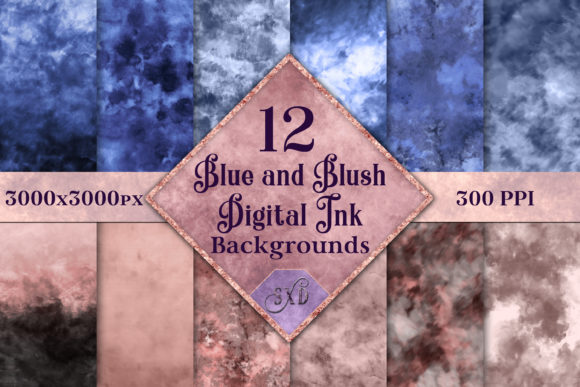
There is a distinct satisfaction in finding the perfect visual element that ties a project together. Whether you are designing a wedding invitation, crafting a brand identity for a boutique, or laying out a blog post, the background sets the tone before a single word is read. The Blue and Blush Digital Ink Backgrounds collection offers a sophisticated solution for creators who need high-quality, artistic textures without the hassle of creating them from scratch. This set features 12 digitally-painted images created using digital ink and other brushes, providing a hand-crafted aesthetic that feels organic and warm.
However, many designers and business owners stumble when integrating stock assets into their workflows. It is not enough to simply download a file; understanding how to evaluate, apply, and maximize these resources is what separates amateur results from professional polish. Let's explore how to make the most of this specific collection while avoiding common pitfalls that can undermine your design efforts.
Understanding the Value of High-Resolution Assets
One of the first mistakes creators make is overlooking technical specifications until it is too late. You might find a beautiful image online, only to discover it pixelates when printed on a large banner or looks muddy on a high-DPI screen. This is where the Blue and Blush Digital Ink Backgrounds set stands out. These images are 300PPI and measure 3000x3000px.
Why does this matter? A resolution of 300 pixels per inch is the industry standard for crisp, clear printing. If you attempt to print a 72PPI web image on physical stationery, the result will be blurry and unprofessional. Similarly, a 3000x3000 pixel dimension ensures you have ample room to crop, zoom, or layer text without losing detail. Before purchasing any digital asset, always verify the PPI and dimensions. With this set, you are guaranteed print-ready quality straight out of the .ZIP file, saving you the time and cost of upscaling or recreating images.
Navigating Licensing and Commercial Use
A frequent source of anxiety for freelancers and small business owners is copyright confusion. Many hesitate to use digital backgrounds because they are unsure if they are allowed to use them in products they sell. A critical advantage of this collection is that it is suitable for commercial use. This means you can confidently incorporate these textures into client projects, merchandise, or marketing materials without fearing legal repercussions.
Nevertheless, "commercial use" can sometimes be misunderstood. It generally allows you to use the images as part of a larger design, but it rarely permits you to resell the raw files themselves. For instance, you can use a blue ink splash as the background for a greeting card you sell, but you cannot package the 12 .JPG images and sell them as a competing texture pack. Always read the specific license terms included in your download. Being proactive about licensing protects your reputation and ensures your business operates on solid legal ground.
Avoiding the "One-Size-Fits-All" Trap
When working with a cohesive set like this, there is a temptation to use every image in a single project or to force an image to fit where it doesn't belong. The Blue and Blush Digital Ink Backgrounds set features 12 unique variations. While they share a color palette, each image has a different flow, density, and composition.
A common error is ignoring the negative space within the artwork. Digital ink often creates natural pockets of lighter or darker areas. If you place white text over a dense, dark blue ink blotch without adjusting the contrast or adding a text box, your message becomes unreadable. Instead, analyze each of the 12 images to find the one where the ink flow naturally frames your content. Use the lighter blush tones for text-heavy areas and reserve the deeper blue swirls for borders or decorative accents. This strategic selection enhances readability and visual hierarchy.
Practical Tips for Integration
To get the best results, consider how these backgrounds interact with your other design elements. Here are a few corrective steps to elevate your workflow:
- Check Color Profiles: Ensure your design software is set to the correct color mode (CMYK for print, RGB for digital) before importing these .JPG files to prevent unexpected color shifts.
- Layer Wisely: Don't just slap the background behind your text. Try lowering the opacity slightly or using blending modes like "Multiply" or "Overlay" to integrate the ink texture more naturally with your foreground elements.
- Crop with Purpose: Since these are square images (3000x3000px), you may need to crop them for social media stories or wide website headers. Focus on the most interesting part of the ink flow rather than centering the image by default.
- Organize Immediately: Upon downloading the 1 .ZIP file, extract the contents to a dedicated folder. Rename the files descriptively (e.g., "Blue-Ink-Heavy-Corner.jpg") so you can find the right texture quickly during future projects.
The Efficiency of Curated Collections
Time is a non-renewable resource for entrepreneurs and marketers. Searching for individual images that match in style and color can take hours, often resulting in a mismatched final product. By choosing a curated set, you ensure visual consistency across your brand materials. Imagine creating a series of Instagram posts, a newsletter header, and a flyer that all share the same artistic DNA. This consistency builds brand recognition and trust with your audience.
Furthermore, working with digitally-painted images offers a level of uniqueness that generic vector patterns often lack. The brush strokes in the Blue and Blush Digital Ink Backgrounds mimic traditional media, adding a human touch to digital designs. This is particularly effective for industries like wellness, education, and artisanal goods, where authenticity is highly valued. Avoid the mistake of over-polishing your designs to the point of sterility; let these organic textures bring warmth to your communication.
Making the Right Choice for Your Project
Before you finalize your decision to use these backgrounds, ask yourself a few questions. Does the blue and blush palette align with my brand's emotional message? Blue often conveys trust and calm, while blush adds a touch of creativity and softness. If your brand is aggressive or high-energy, you might need to adjust the saturation or combine these backgrounds with bolder typography to create the right contrast.
Also, consider the medium. While these files are high-resolution, remember that .JPG is a compressed format. For most uses, this is perfectly fine and ensures smaller file sizes for faster web loading. However, if you plan to do extensive photo manipulation involving heavy color grading, be aware that repeated saving of .JPGs can introduce artifacts. For standard layout work, printing, and web display, the quality provided in this set is more than sufficient.
In conclusion, tools like the Blue and Blush Digital Ink Backgrounds are powerful assets when used with intention. By respecting the technical specifications, understanding the licensing, and applying thoughtful design principles, you can transform simple textures into compelling visual stories. Avoid the rush to just "get it done" and take the time to select the right image from the 12 available options. Your attention to detail will reflect in the quality of your final output, satisfying both your clients and your own standards of excellence.