Evaluating High-Resolution Brushes Textures for Professional Graphic Design and Print Projects
In the realm of digital design, the difference between a flat, unconvincing composition and a tactile, engaging piece often lies in the quality of the underlying assets. Brushes textures serve as a fundamental building block for designers working across various mediums, from scrapbooking and invitation suites to large-format card design. When evaluating resources for these projects, the technical specifications of the files are just as critical as the aesthetic appeal. A specific category of assets has gained traction among professionals: high-quality JPG files measuring 3600x3600 pixels at 300 DPI, formatted for 12x12 inch layouts. Understanding the distinct advantages of this format, alongside its limitations compared to vector or layered alternatives, is essential for making informed purchasing and usage decisions.
Defining the Standard: Resolution and Format Specifics
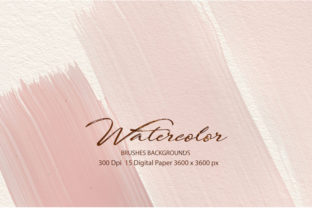
When discussing brushes textures in a professional context, one must first address the technical baseline. The specification of 300 DPI (dots per inch) at a dimension of 3600x3600 pixels translates directly to a physical print size of 12x12 inches (approximately 30.5cm x 30.5cm). This is not an arbitrary number; it is the industry standard for high-quality commercial printing. For designers creating wedding invitations, greeting cards, or scrapbook pages intended for physical production, this resolution ensures that the texture retains its grain, brush stroke detail, and color depth without pixelation.
The choice of the JPG format for these textures presents a specific set of tradeoffs. Unlike PNG files which support transparency, or TIFF and PSD files which can retain layers and lossless compression, JPGs are raster images with a solid background, typically white or off-white. This makes them distinct from "brushes" in software like Photoshop, which are dynamic tools applied to a layer. Instead, these are static background textures that mimic the look of hand-painted strokes, watercolor washes, or dry ink marks. The decision to use this format often hinges on workflow efficiency versus editing flexibility.
Comparative Analysis: Static JPGs vs. Dynamic Brushes and Vectors
To determine if high-resolution JPG brushes textures are the right fit for a project, it is helpful to compare them against other common resource types available to designers.
- vs. Software-Specific Brush Sets (.ABR): Dynamic brushes allow for infinite variation in stroke direction, pressure sensitivity, and color. They are ideal for creating unique, organic elements from scratch. However, they require time and skill to apply effectively. In contrast, pre-rendered 12x12 JPG textures offer an instant, consistent look. If a designer needs a uniform background for a batch of 50 wedding invites, dragging and dropping a high-res JPG is significantly faster than painting hundreds of individual strokes.
- vs. Vector Textures (.EPS/.AI): Vectors offer infinite scalability and small file sizes. They are superior for logos or signage that may be blown up to billboard size. However, vectors often lack the authentic, gritty randomness of real-world media. A 300 DPI raster texture captures the nuanced imperfections of paper grain and pigment distribution that vectors struggle to emulate realistically. For projects capped at 12x12 inches, the raster format often provides a more authentic "hand-made" feel.
- vs. Layered PSD/TIFF Files: Layered files offer maximum control, allowing users to adjust blending modes, opacity, and masks for specific parts of the texture. The downside is file size and complexity. A folder of 50 layered PSDs can consume gigabytes of space and slow down older computers. The 3600x3600 JPG alternative provides a lightweight, universally compatible solution that works in almost any image editor, from professional suites to basic mobile apps.
Optimal Use Cases for 12x12 Inch Textures
The 12x12 inch format is particularly dominant in specific niches of the design world. Recognizing where these assets shine helps in allocating budget and time effectively.
Scrapbooking and Digital Planning
Digital scrapbooking relies heavily on the 12x12 inch canvas. This size matches the physical paper standards used in traditional scrapbooking albums. Using brushes textures specifically sized for this format eliminates the need for resizing, which can degrade image quality if done incorrectly. Designers can layer these textures beneath photos and journaling cards to create depth without worrying about resolution mismatches.
Invitation and Card Design
For square greeting cards or save-the-date magnets, the 3600x3600 pixel dimension is a perfect match. The 300 DPI requirement is non-negotiable here; anything lower risks appearing blurry when printed on cardstock. These textures serve as excellent bases for typography. Because they are JPGs, designers often use blending modes like "Multiply" or "Overlay" to integrate text seamlessly, making the lettering appear as though it is printed directly onto the textured surface.
Backgrounds for Social Media and Web
While web graphics typically require lower resolutions (72 DPI), starting with a 300 DPI source file offers a significant advantage: downsampling. Taking a high-fidelity 3600px image and reducing it for Instagram or website headers results in a crisp, clean final product. It allows the same asset library to serve both print and digital marketing needs, providing better value for money.
Limitations and Decision Factors
Despite their utility, brushes textures in JPG format are not a universal solution. Several limitations must be weighed before integration into a workflow.
The primary constraint is the lack of transparency. Since JPGs do not support alpha channels, the texture comes with a baked-in background color. If a project requires a texture element to sit over a complex, multi-colored background without a square bounding box, the designer must manually remove the background using selection tools. This can be time-consuming if the texture has low contrast against its background. In such cases, PNG versions or transparent brush sets would be superior choices.
Furthermore, while 300 DPI is excellent for prints up to 12x12 inches, it is insufficient for large-format printing like posters or banners. Attempting to scale these files beyond their native dimensions will result in visible pixelation and loss of detail. Designers working on variable-sized deliverables should verify the final output size before committing to this specific resolution.
Another consideration is editability. Once a texture is saved as a JPG, the individual brush strokes are flattened. You cannot change the color of a specific stroke or erase a smudge without affecting the surrounding pixels. For projects requiring heavy manipulation or color customization, layered formats remain the gold standard.
Making the Right Choice for Your Project
Selecting the appropriate texture resource ultimately depends on the balance between convenience, authenticity, and control. If the priority is speed and the project involves standard print sizes like invitations or scrapbook pages, the 3600x3600 px 300 DPI JPG format is an exceptionally efficient choice. It bridges the gap between the authenticity of traditional media and the speed of digital workflows.
However, if the project demands intricate masking, infinite scalability, or dynamic application of strokes, alternative formats like vectors or software-specific brushes should be prioritized. Many professional designers maintain a hybrid library, utilizing high-res JPGs for backgrounds and base layers while employing dynamic brushes for foreground accents and custom details.
When evaluating a collection of brushes textures, look beyond the preview images. Verify the actual file properties to ensure they meet the 300 DPI standard. Check the color profile; sRGB is generally safer for web and consumer printing, while Adobe RGB may be preferred for professional offset printing. By understanding the specific strengths and constraints of the 12x12 inch high-resolution JPG format, designers can make strategic decisions that enhance the quality of their work without unnecessary workflow friction.