Choosing the Right Fireworks Graphics: A Guide to Formats and Creative Applications
Visual elements serve as the cornerstone of effective design, particularly when capturing moments of celebration or adding dynamic energy to a project. Among the most versatile assets available to designers and hobbyists alike are fireworks graphics. These illustrations range from realistic bursts of light to stylized, whimsical sparkles, offering a way to instantly elevate the mood of any composition. However, selecting the right fireworks resource involves more than just picking an image that looks good; it requires a clear understanding of file formats, intended use cases, and the specific demands of your workflow.
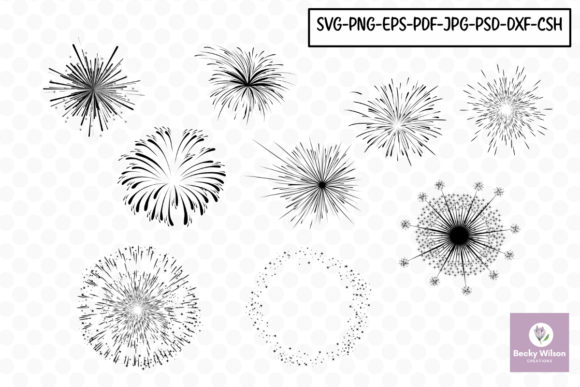
When evaluating a collection of fireworks assets, such as a set containing nine distinct designs, the primary consideration is often the variety of formats provided. A comprehensive package typically includes SVG, PNG, JPG, EPS, and ABR (Photoshop brushes). Each of these formats serves a unique purpose in the creative ecosystem, and understanding their differences is crucial for maximizing the value of your download.
Navigating File Formats: Vector vs. Raster vs. Brushes
The distinction between vector and raster graphics is the first major decision point. Vector files, such as SVG and EPS, define images using mathematical paths rather than pixels. This makes them infinitely scalable. If you are designing a large-format banner for a community event or a book cover that needs to be printed at various sizes, vector fireworks are indispensable. They ensure that the edges of the sparks remain crisp and sharp, regardless of how much you enlarge the image. The EPS format is particularly valuable for professional printing environments, as it is widely supported by industry-standard software and maintains high fidelity during the pre-press process.
In contrast, raster formats like PNG and JPG are composed of a fixed grid of pixels. While they cannot be enlarged without losing quality, they offer immediate usability for digital projects. The PNG format is often preferred for digital layouts, school projects, and web graphics because it supports transparency. This allows you to place a firework burst directly over a photograph or a colored background without a distracting white box surrounding it. Conversely, JPG files are universally compatible and have smaller file sizes, making them suitable for email announcements or social media posts where bandwidth and loading speed are concerns, though they lack the transparency feature of PNGs.
A third category, represented by ABR files, offers a different approach entirely. These are brushes specifically designed for Adobe Photoshop. Rather than placing a static image, ABR brushes allow you to "paint" fireworks onto your canvas. This provides a level of organic control that static images cannot match. You can vary the pressure, opacity, and flow to create custom trails and bursts that feel hand-drawn and unique. For digital artists creating journal cards or complex digital scrapbooking layouts, this interactivity can be a significant advantage over dragging and dropping pre-made clips.
Assessing Suitability for Print and Physical Crafts
For those focused on tangible outputs like wrapping paper, invitations, and stationery, the choice of format directly impacts the final quality. Printing requires high resolution and clean lines. When creating wedding planners or formal announcements, the elegance of the design is paramount. Vector formats (SVG/EPS) are generally the safest bet here, as they guarantee that fine details, such as the trailing sparks of a firework, do not become pixelated or blurry on paper.
However, if you are engaging in scrapbooking or card making using home printers, high-resolution PNGs are often sufficient and easier to manipulate in consumer-grade software. The key is to verify the DPI (dots per inch) of the raster files. A standard screen resolution of 72 DPI will look acceptable on a monitor but may appear grainy when printed. Professional-grade assets should ideally provide raster options at 300 DPI or higher to ensure crisp results on cardstock and photo paper.
Consider the application of calendars and postcards. These items often combine photography with graphic overlays. A fireworks overlay can transform a standard night-sky photo into a celebratory New Year's card. In this scenario, a PNG with a transparent background allows for seamless blending modes in editing software, letting the light of the fireworks interact naturally with the underlying image. Using a JPG with a white background would require tedious masking to achieve the same effect, illustrating why format selection is a practical efficiency issue, not just an aesthetic one.
Digital Workflows and Educational Projects
In the realm of digital layouts and school projects, flexibility and ease of use take precedence. Students and educators often need assets that can be quickly integrated into presentations, posters, or online reports. Here, the versatility of having multiple formats becomes evident. A student working on a history project about national holidays might use a JPG for a quick slide deck, while a graphic design student creating a portfolio piece might utilize the SVG to manipulate individual sparks within a vector editor.
Digital scrapbooking has evolved into a sophisticated hobby that blends photography with artistic embellishment. The inclusion of ABR brushes in a fireworks pack adds significant value for this audience. Unlike static clips, brushes allow for the creation of depth and movement. A user can build a scene where fireworks explode at different distances, using softer brush strokes for distant bursts and sharp, detailed clicks for foreground elements. This layering capability mimics the real-life experience of watching a show, adding a narrative quality to digital pages that static images struggle to achieve.
Furthermore, for book covers and journal cards, the style of the fireworks matters as much as the format. Some designs lean towards photorealism, suitable for thriller novels or dramatic announcements, while others are more illustrative and whimsical, fitting for children's books or festive party invites. Evaluating a set of nine fireworks allows the creator to choose the specific mood needed—whether it's a singular, massive explosion or a cluster of delicate sparklers.
Making the Right Choice: Tradeoffs and Limitations
While a multi-format fireworks collection offers extensive utility, it is important to recognize limitations. Vector files, though scalable, can sometimes lack the subtle texture and glow effects that raster images capture naturally. Creating a realistic glow in vector software often requires complex gradient meshes or blur filters that can slow down performance. In such cases, a high-quality PNG with pre-rendered lighting effects might be the superior choice for achieving a specific atmospheric look.
Conversely, relying solely on raster images limits your ability to adapt to unexpected size requirements. If a client suddenly requests a billboard-sized version of a design created with low-resolution JPGs, the project may need to be restarted. This highlights the importance of archiving the vector versions (SVG/EPS) even if you primarily work in raster environments. They serve as a future-proof master file.
Additionally, the complexity of ABR brushes can be a barrier for beginners. They require familiarity with Photoshop settings like scattering, shape dynamics, and transfer. For a user who simply needs to drop an image onto a flyer, these brushes might be unnecessary overhead. In this context, the "best" option is subjective and depends entirely on the user's technical comfort level and time constraints.
Strategic Application Across Industries
The utility of fireworks graphics extends across various sectors. Wedding planners often use these motifs for "save the date" cards or reception signage, symbolizing the start of a new chapter. In this professional context, the polish provided by EPS vectors ensures that branding remains consistent across different print vendors. Meanwhile, holiday crafts enthusiasts might appreciate the playful nature of stylized fireworks for decorating gift tags or homemade ornaments, where the charm of the design outweighs the need for technical perfection.
For announcements ranging from grand openings to birth notifications, the imagery conveys excitement and joy. The ability to customize colors is another factor to consider. Vector files allow for easy recoloring to match specific brand palettes or theme colors (e.g., changing gold sparks to silver for a specific event). Raster images are harder to recolor without affecting the luminosity and blend modes, potentially requiring more advanced editing skills.
Ultimately, the decision to utilize a specific fireworks resource should be driven by the end goal of the project. If the priority is scalability and professional print readiness, vector formats are the logical choice. If speed, texture, and digital integration are key, raster PNGs and JPGs offer convenience. For those seeking artistic expression and customizability within a photo-editing environment, Photoshop brushes provide a unique toolkit. By understanding the strengths and tradeoffs of each format within a diverse collection, creators can select the tools that best align with their vision, ensuring their final output is both visually striking and technically sound.