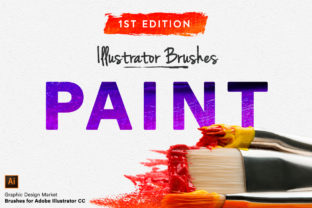
Illustrator Paint Brushes 1st Edition: Real Handmade Strokes
There is a distinct difference between art that looks like it was made by a computer and art that feels like it was made by a human. While digital tools offer precision, they often lack the organic imperfections that give illustrations soul. This is where the Illustrator Paint Brushes - 1st Edition changes the game for creators of all levels. Instead of spending hours trying to manually texture every line or struggling with complex settings to mimic real media, this collection provides an instant bridge between the digital and physical worlds.
This set is not just another pack of generic vector shapes. It is a curated library of Illustrator vector paint brushes – made from actual paint strokes. Every single brush in this collection was created by physically painting on paper, scanning those textures, and converting them into high-quality vector paths. The result is a toolset that retains the grit, flow, and natural variation of real bristles while offering the scalability and editability of Adobe Illustrator.
Why Authentic Texture Matters in Digital Design
In a world saturated with clean, flat design, adding a handmade touch can make your work stand out significantly. Whether you are a freelancer pitching to a new client, a small business owner creating social media graphics, or a hobbyist designing invitations, authenticity builds connection. Viewers subconsciously respond to textures that feel tactile and real.
The main purpose of the Illustrator Paint Brushes - 1st Edition is to eliminate the barrier between your idea and the final look. Often, designers know they want a "painterly" style but lack the traditional painting skills or the time to create custom brushes from scratch. This set solves that problem immediately. By applying these brushes to your existing vector lines, you transform simple, regular paths into beautiful, hand-painted strokes instantly. It allows you to focus on composition and storytelling rather than getting bogged down in technical texturing processes.
What Is Inside the First Edition Set?
Versatility is key when building a digital toolkit. You rarely need just one type of line; you need a range of weights to create depth, hierarchy, and interest in your artwork. This first edition set includes 17 authentic, realistic vector brushes, carefully categorized to handle any drawing task:
- 8 Thin Brushes: Perfect for fine details, intricate linework, signatures, and delicate outlines that require precision without looking sterile.
- 5 Mid Brushes: The workhorses of the set, ideal for general illustration, lettering, and defining shapes with a natural flow.
- 4 Thick Brushes: Designed for bold statements, heavy shadows, background elements, and creating strong visual impact.
Each brush has been carefully selected from a large assortment of actual paint strokes. The creators didn't just scan one swipe of a brush; they painted extensively to find the perfect stroke for each size. This ensures that when you apply the brush, it doesn't look repetitive or mechanical. The variation in the edges and the density of the "paint" mimics how real ink or acrylic sits on paper.
Practical Uses for Creators and Professionals
The beauty of these one-click application brushes is their adaptability across different industries and projects. Because they are compatible with Adobe Illustrator, they fit seamlessly into professional workflows.
For Marketers and Bloggers: Custom illustrations are powerful for breaking up text and explaining concepts. Using these brushes, you can create unique infographics or header images that feel personal and approachable, increasing engagement compared to stock photography.
For Product Designers and Entrepreneurs: If you are packaging a product or designing a logo that needs to feel artisanal or eco-friendly, these strokes add that crucial human element. A logo drawn with a thick, textured brush can convey craftsmanship better than a perfect geometric shape.
For Educators and Content Creators: Visual aids often benefit from a sketch-like quality. These brushes allow you to produce educational materials that look like they were drawn on a whiteboard or in a notebook, which can help students retain information better by feeling less "corporate."
How to Get the Best Results
Using the Illustrator Paint Brushes - 1st Edition is straightforward, but a few tips can help you maximize their potential. Since these are vector-based, they scale infinitely without losing quality. However, the way you draw your initial path matters.
- Vary Your Pressure (if using a tablet): Even though the texture is baked into the brush, varying the speed and pressure of your stylus can change how the brush deposits its "ink," creating more dynamic lines.
- Layer Your Strokes: Don't be afraid to overlap lines. Real painting involves layering. Use the thin brushes for details over the mid or thick brushes to create depth.
- Experiment with Opacity: While the brushes come with realistic textures, adjusting the opacity of the stroke in Illustrator can simulate watercolor effects or faded ink.
- Combine Sizes: A common mistake beginners make is sticking to one brush size. Mix the 8 thin, 5 mid, and 4 thick brushes within a single illustration to guide the viewer's eye and create a balanced composition.
Important Considerations Before You Start
Before diving in, it is helpful to understand that while these brushes do the heavy lifting, they are tools, not magic wands. The quality of your final artwork still depends on your underlying drawing skills and composition. These brushes excel when applied to thoughtful paths.
Additionally, because these are Illustrator vector paint brushes – made from actual paint strokes, they contain more anchor points than a standard geometric line. While modern computers handle this easily, if you are working on extremely complex illustrations with thousands of strokes, keep an eye on your file size. However, for most standard projects, logos, and marketing materials, the performance is seamless.
It is also worth noting that this is a first edition set. This implies a foundational collection of essential styles. It covers the core needs of most artists—thin, medium, and thick variations—making it an excellent starting point for anyone looking to upgrade their digital arsenal without buying dozens of disjointed packs.
Elevating Your Workflow Instantly
The transition from simple lines to expressive art should not be a struggle. With the Illustrator Paint Brushes - 1st Edition, the gap between concept and execution narrows significantly. You no longer need to be a master painter to achieve a painterly look. By choosing the best strokes from a massive library of hand-painted originals, this set offers a shortcut to quality that respects the integrity of traditional art forms.
Whether you are refining a brand identity, illustrating a children's book, or simply adding flair to your weekly blog posts, these brushes provide the texture and warmth that digital art often misses. They invite you to play, experiment, and create work that feels genuinely human. In a digital age, that handmade touch is more valuable than ever.